Google Play Says "10+". Here's How to See Your Exact Install Count
Play rounds every app's installs down to a label like 10+ or 50+, so early growth is invisible. The exact number is already on the public page. Here's where it is, how to watch it, and what it can and can't tell you.
One of my apps sat at "10+" on Google Play for weeks. Then an app-marketing service emailed me, quoting its exact download count, a number Play only ever showed as 10+. They hadn't hacked anything. They had simply read a number that is already sitting on the public Play page, and I wanted to see it myself without waiting for a sales email.
Why Play only shows "10+"
Play rounds installs down to a fixed ladder of labels: 1+, 5+, 10+, 50+, 100+, 500+, 1K+, 5K+ and so on. The label only changes when you cross the next step. For an established app that barely matters. For an indie developer in the first months it means your app can grow from 10 to 49 installs and the listing never moves.
Where the exact number lives
The public page for every production app carries the label and the real count side by side in its embedded data, something like:
["50+", 50, 54, "50+"] — the label, its lower bound, and the exact installs: 54.
Anyone can read it, which is exactly how outside services quote "your exact downloads". It is undocumented, so Google could change the format at any time, but for now it is the most precise public figure there is.
It isn't Play Console's number
Play Console measures installs in its own ways (acquisitions, active devices and more), so the public count can differ from what Console shows. Console is the official figure for your own apps. The public number is useful for one thing: watching the trend, for your apps and anyone else's, without signing in.
What it's good for
- Seeing early growth. 25 installs and 54 installs both read "10+" and "50+" on the listing; the exact count shows the movement in between.
- Checking whether a push worked. After a release, a post or a campaign, see whether the count actually moved over the next days.
- Knowing how far the next label is. "100+ in 46" is a far more motivating number than "50+".
- Looking at comparable apps. The same public figure exists for every production app, so you can get a realistic sense of how apps in your niche are doing.
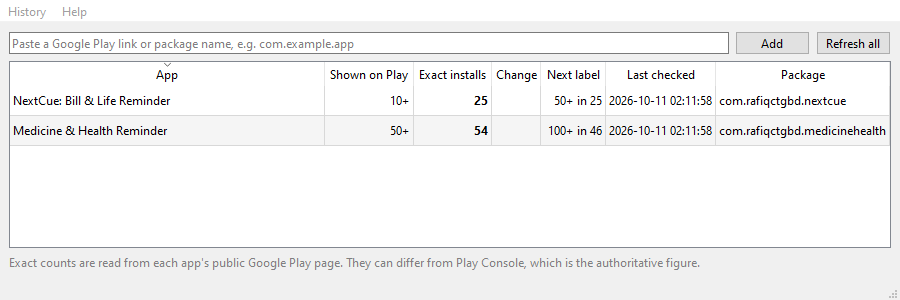
TrueInstalls: a free Windows app that tracks it for you
Paste a Google Play link or package name to add an app, yours or anyone's. TrueInstalls shows the public label and the exact install count side by side, the change since an earlier day, and how many installs are left until the next label. It keeps a history of every check so you can watch the count grow, and re-checks all your apps each time it starts. Your list stays on your PC; it only ever talks to Google Play. No installer: unzip and run.
Download TrueInstalls for WindowsThe limits, plainly
- Production apps only. Apps in internal or closed testing have no public page, so there is nothing to read until you go to production.
- An undocumented format. If Google changes how the page carries the number, tools that read it need an update.
- Not Play Console. Use Console for official figures; use this for the trend.
- Windows only (10 or 11, 64-bit), and Windows SmartScreen will warn you on first run: choose "More info", then "Run anyway".
The short version
Play's "10+" hides the early growth every indie developer wants to see. The exact number is on the public page; read it, keep a history, and watch the trend, while treating Play Console as the official count.
Related reading
Frequently asked questions
Why doesn't the number match Play Console?
Play Console measures installs in its own ways, so the public figure can differ. Use Console for your app's official numbers; use the public count to follow the trend over time.
Can I see the count for an app in testing?
No. Apps in internal or closed testing have no public Play page, so there is a count only once the app is in production.
Can I see other people's apps?
Yes. The figure is on the public page of any production app, so you can add any app's link or package name.
Is my list sent anywhere?
No. Your list and history stay on your PC; TrueInstalls only sends requests to play.google.com to read the pages.